Shape the sweep, then perform its resonance
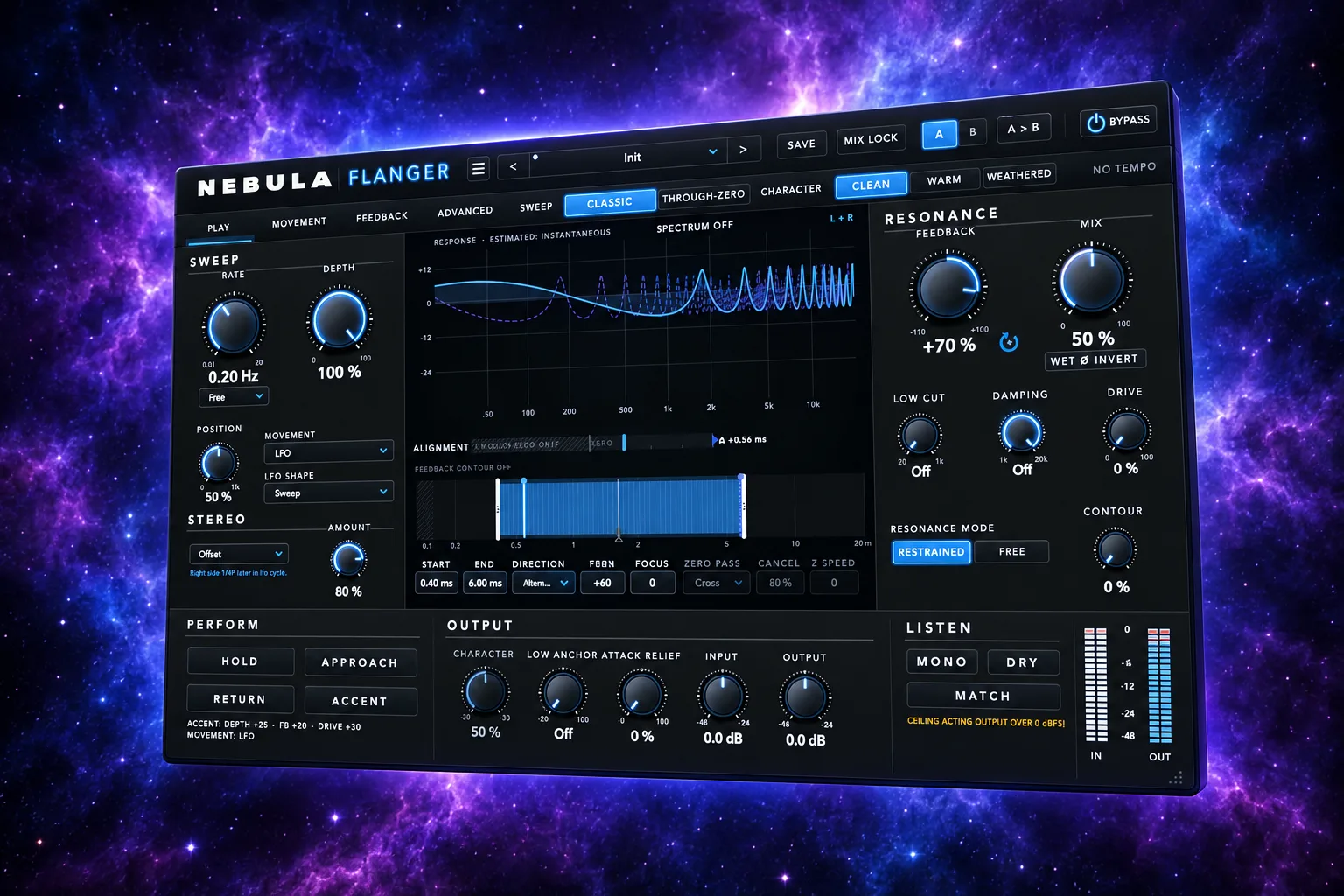
Flanger is one flanger engine that already works with only Rate, Depth, Feedback and Mix. Around it are an editable picture of the sweep, a full Through-Zero mode, performance actions and a Comb View drawn by the same code as the sound.
Also in Nebula Complete and All Access.
Highlights
What sets it apart
Sweep Window
Drag Start, End, Position and Focus in a picture of the movement, or draw a curve of up to 32 points that loops or plays once when triggered.
Through-Zero, fully built
The sweep can cross alignment, with Zero Pass, Cancellation and a crossing guard. At Mix 50 aligned and inverted, cancellation is below -120 dB.
An honest display
The Comb View is computed by the engine's own code and matches the measured response within 0.5 dB to 16 kHz in the tested settings.
Features
Everything in Nebula Flanger
Engine
- Rate, Depth, Feedback ± and Mix
- Through-Zero with alignment strip
- Feedback Contour
- Low Anchor keeps the lows dry
- Attack Relief lets transients through clean
Movement
- Barber-pole direction
- Four modulation sources, drift and triggers
- Movement curve of 2 to 32 points
Performance
- Hold, Cross, Return and Accent, from buttons or MIDI C1 to F1
- A/B, Mix Lock and user presets
- MATCH, DRY and MONO listening checks
- Measured spectrum behind the Comb View
Claude
Claude can help
Connect Claude... in the panel's menu installs the nebula-flanger connector (13 tools). Claude can read and change every setting by track name, draw the movement curve, load and save presets, fire Cross or the triggered curve, and measure where the sweep is and the null depth. Its undo takes back only Claude's changes. Inside Nebula DAW, flanger_get_curve and flanger_set_curve reach the curve and the DAW's general tools cover the rest.
Measured
What the tests show
- 988 core checks and 87 plug-in checks, 0 failures; 18 of 18 rules proved by breaking them
- auval -strict and pluginval at strictness 10: ALL GREEN
- Mix 0 and Bypass are the input delayed by exactly the reported latency, bit for bit, at 44.1, 48 and 96 kHz
- Clean adds no harmonics: -147 dB THD+N
- Presets levelled on real material (BS.1770), each within about ±3 dB of Init on every source; Deep Zero Cancel is the deliberate exception
- CPU at 48 kHz, 512-sample blocks on an Apple M5 Max: about 0.6% of one core at Init, 1.3% with everything on
Questions
Nebula Flanger FAQ
Do I need to learn all of it?
No. The README says to start with Init and only Rate, Depth, Feedback and Mix, which are meant to stand on their own. The rest is there when you want it.
Will it thin out my kick or bass?
Low Anchor keeps the lows as the dry signal, within 0.3 dB, and several psytrance presets use it to stay kick-safe.
How do I play the actions?
Choose a MIDI track in the plug-in header's MIDI menu in Logic. C1 is Hold, D1 Cross, E1 Return, F1 Accent; any other note fires the triggered curve.
Is there a VST3?
Not yet. It is built as an Audio Unit; VST3 comes after the owner signs off on the sound.
What does it need?
macOS 11 or later, on Apple silicon or Intel. It loads as AU or VST3 in Logic, Ableton Live, Bitwig, Cubase, FL Studio, Reaper and Nebula DAW.
Try Nebula Flanger free for 30 days
Download, install, and every product runs fully for 30 days. No account and no card needed. Buy the ones you keep.