Shimmer reverb that morphs between four scenes
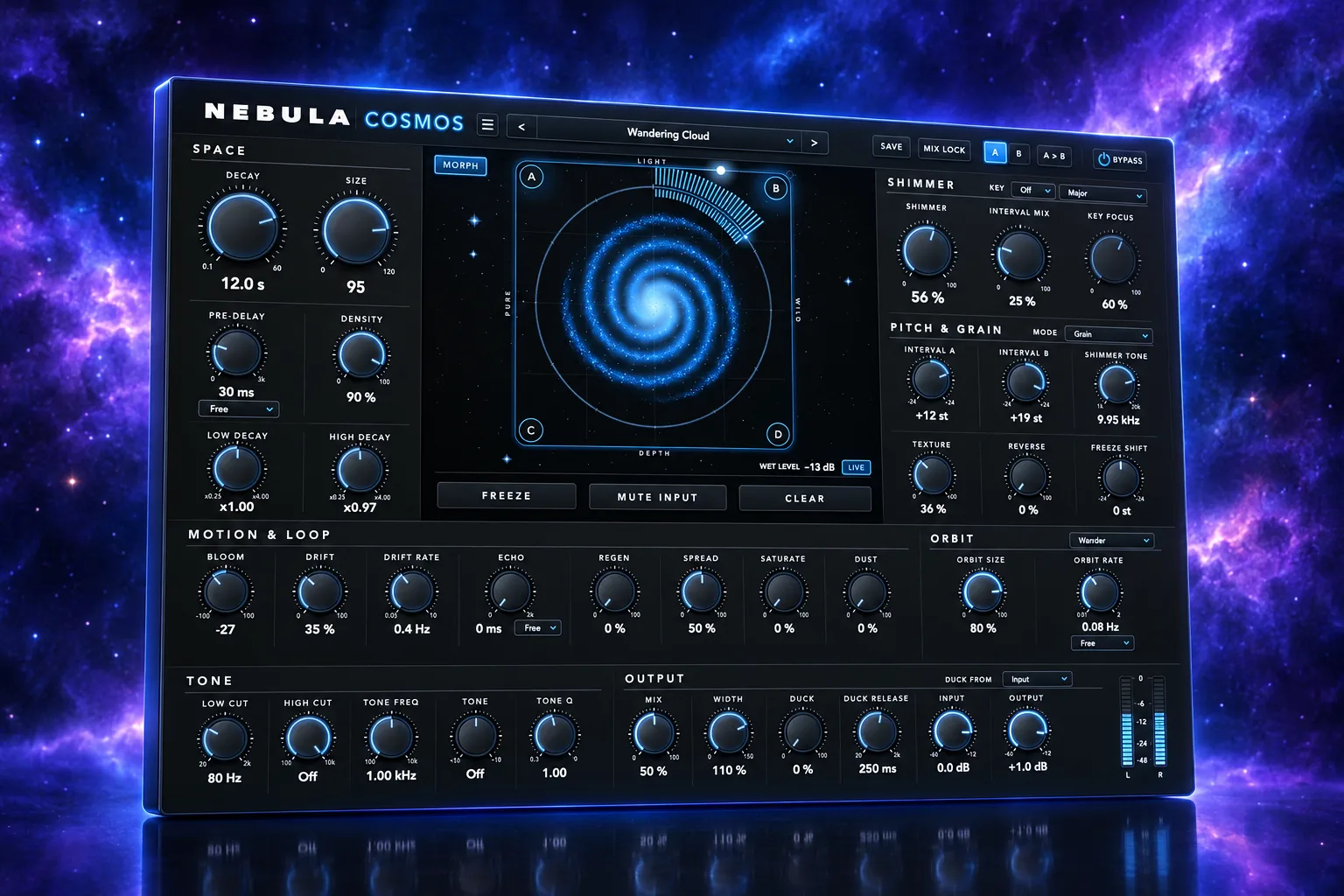
Nebula Cosmos is the creative sibling of Nebula Reverb: the same engine with a shimmer loop that climbs in pitch on every pass. A morph pad glides between four complete scenes, by hand or on its own orbit.
Also in Nebula Complete and All Access.
Highlights
What sets it apart
A shimmer with two intervals
Two intervals from -24 to +24 semitones are blended and fed back, so the tail climbs on every pass. Grain mode uses a granular shifter; Spectral mode uses a phase vocoder for cleaner sustained notes.
A morph pad with four scenes
Each corner holds a complete sound. Orbit moves the point by itself in a circle, a figure 8 or a slow wander, free in Hz or locked to the song from a 1/4 note to 32 bars.
Keeps the shimmer in key
Key, Scale and Key Focus put narrow resonances at the scale's notes inside the loop, so out-of-key notes fade. In Nebula DAW the chord track can take over, and the loop makes room on each chord change.
Features
Everything in Nebula Cosmos
Shimmer
- Shimmer amount, two intervals and an interval mix
- Shimmer Tone and Texture, from long smooth grains to short scattered ones
- Reverse grains for a smoother, organ-like shimmer
- Grain or Spectral shimmer mode
Motion and wear
- Morph pad with four scenes and an Orbit
- Freeze Shift: the frozen pad heard transposed
- Dust: tape wow, flutter and lo-fi wear on what enters the reverb
The reverb underneath
- All 31 of Nebula Reverb's controls, including Freeze, Regen and Duck
- Duck from the input, a sidechain or Kick Link
- A/B, Mix Lock, user presets and 17 colour themes
Nebula Link
Works with the rest of the range
Reads Nebula Link v1 like Nebula Reverb. With Duck Source set to Kick Link it ducks for as long as Nebula Kick's published kick sounds (Kick must have "Publish this kick's handoff" ticked). Inside Nebula DAW the song's Kick hits drive it, and the chord track can drive Key Focus.
Claude
Claude can help
The panel's Claude connector has 15 tools. Claude can find any open Cosmos, read and set every control, measure it, load and save presets, clear the tail and undo its own changes. It can also work with the four scenes: read them, change one, store the knobs in a corner, load a corner onto the knobs, or make all four from the current sound. In Nebula DAW the same scene tools are cosmos_get_scenes, cosmos_set_scene, cosmos_store_scene, cosmos_load_scene and cosmos_scenes_from_knobs.
Measured
What the tests show
- auval -strict and pluginval at strictness 10 (scripts/validate.sh)
- Core: 95 checks, plug-in: 89, editor kit: 21, all with 0 failures
- Mix 0 and bypass are bit-exact
- Output is identical at block sizes 7 to 1024 with every feature on
- Presets are within 1 dB of each other
- Shimmer level stays within 2 dB from 0 to 100 %
Questions
Nebula Cosmos FAQ
How is it different from Nebula Reverb?
It runs Nebula Reverb's core unchanged and adds shimmer, the morph pad, Orbit, Freeze Shift, Dust and Key Focus. Nebula Reverb stays the clean reverb.
Will the shimmer get louder as I turn it up?
No. A measured trim keeps the level within 2 dB from 0 to 100 %, and a leveller holds the return.
Is there a VST3 version?
Not yet. The build makes an Audio Unit only. VST3 waits for the owner's sign-off on the sound.
Does Orbit follow my song's tempo?
Yes, when Orbit Sync is set to a note value from 1/4 to 32 bars. Its phase comes from the playhead. Set to Free, it runs at Orbit Rate in Hz.
What does it need?
macOS 11 or later, on Apple silicon or Intel. It loads as AU or VST3 in Logic, Ableton Live, Bitwig, Cubase, FL Studio, Reaper and Nebula DAW.
Try Nebula Cosmos free for 30 days
Download, install, and every product runs fully for 30 days. No account and no card needed. Buy the ones you keep.